Day 20
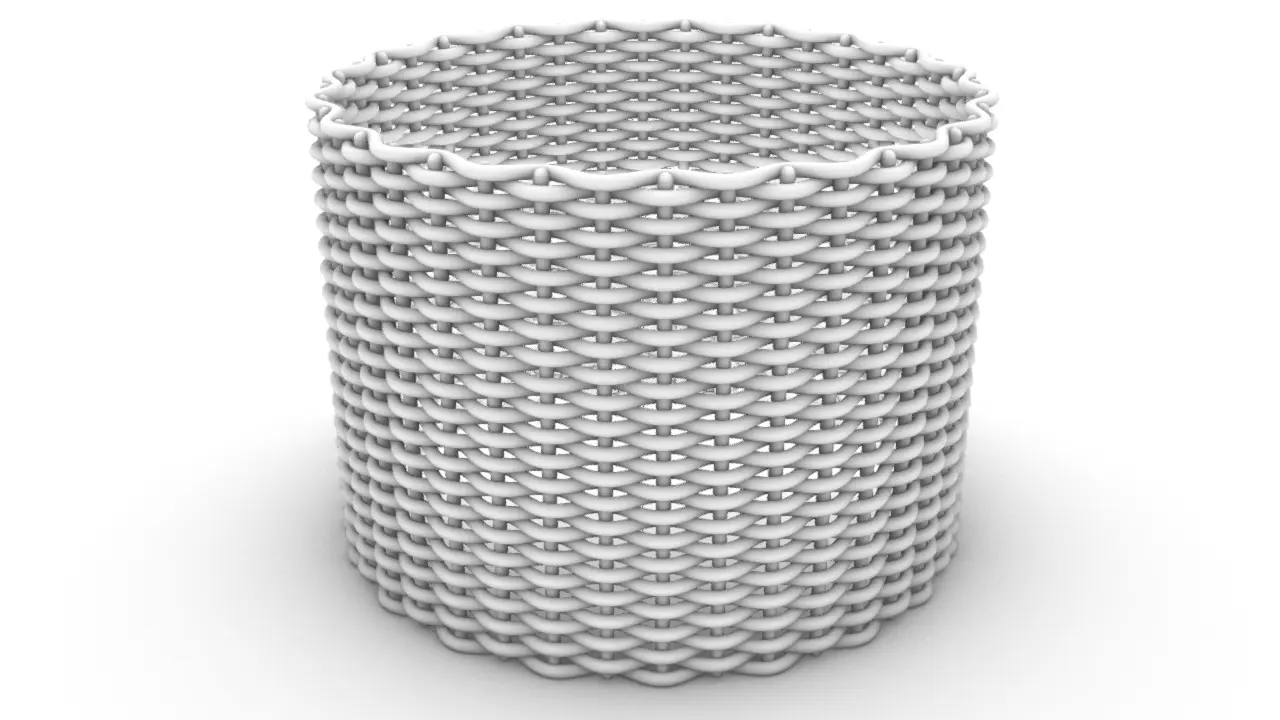
円筒に編み構造
#cylinder#weave#wave#polar#pattern
✅ Inputs
- radius: float – 円筒の半径
- height: float – 円筒の高さ
- amp: float – 波の振幅
- wave_cycles: float – 円周方向の波の繰り返し数(θ 方向)
- num_curves_z: int – Z 方向に配置する水平方向カーブの本数
- res: int – 各曲線の分割精度
- pipe_radius: float – Pipe で立体化する際の太さ
✅ Outputs
- results: list of Brep – 編み構造を模した Pipe の集合体✅ Code
import Rhino.Geometry as rg
import math

# === 🔧 入力パラメータ例 ===
radius = 100.0           # 円筒の半径
height = 150.0           # 円筒の高さ
amp = 3.0                # 波の振幅
wave_cycles = 20.0       # 水平方向の波数(θ方向)
num_curves_z = 40        # Z方向の水平方向カーブ本数
res = 100                # 曲線の分割数
pipe_radius = 2.0        # Pipeの半径

# === 📐 基本設定
circumference = 2 * math.pi * radius
freq_h = wave_cycles * 2 * math.pi / circumference
spacing_z = height / num_curves_z

# === 🌀 水平方向Sin波カーブ(θ方向に波打ち、Z方向に複製)
def create_horizontal_curve(z_offset, reverse=False):
    phase = math.pi if reverse else 0.0
    points = []
    for i in range(res + 1):
        t = float(i) / res
        arc_len = t * circumference
        theta = arc_len / radius
        r = radius + math.sin(arc_len * freq_h + phase) * amp
        x = r * math.cos(theta)
        y = r * math.sin(theta)
        z = z_offset
        points.append(rg.Point3d(x, y, z))
    return rg.Curve.CreateInterpolatedCurve(points, 3)

# === 🔁 水平方向カーブの生成(Z方向に交互反転)
curves = []
for i in range(num_curves_z):
    z = i * spacing_z
    reverse = (i % 2 == 1)
    curves.append(create_horizontal_curve(z, reverse))

# === 🎯 山谷中心のθ位置に垂直線を追加
num_peaks = int(wave_cycles * 2)
peak_thetas = [
    (2 * math.pi * (k / num_peaks)) + (2 * math.pi / (num_peaks * 2))
    for k in range(num_peaks)
]

for theta in peak_thetas:
    x = radius * math.cos(theta)
    y = radius * math.sin(theta)
    start = rg.Point3d(x, y, 0)
    end = rg.Point3d(x, y, height - spacing_z)
    curves.append(rg.Line(start, end).ToNurbsCurve())

# === 🧵 Pipe化
results = []
for c in curves:
    pipes = rg.Brep.CreatePipe(
        c, pipe_radius, False,
        rg.PipeCapMode.Round, True,
        0.001, 0.001
    )
    if pipes:
        results.extend(pipes)
← Grasshopper Python チュートリアル一覧へ戻る
ライセンス・利用規約
| 項目 | 可否 | 説明 |
|---|---|---|
| 自身のプロジェクトへの組み込み | ○ | 個人・商用問わず、スクリプトや作品の一部として自由に使えます。 |
| コードの改変・学習利用 | ○ | 自身の学習や、目的に合わせたカスタマイズは大歓迎です。 |
| SNSへのシェア・紹介 | ○ | 作品の画像やURLのシェアは許可不要です。ぜひご紹介ください! |
| 再配布・転載 | × | コードやファイルを丸ごと自身のサイト等でコンテンツとして公開しないでください。 |
| 素材・プログラムとしての転売 | × | 本サイトの内容をそのまま、あるいは微調整のみで有料販売しないでください。 |
| 著作権表示・リンク | 任意 | 必須ではありませんが、引用元としてリンクを貼っていただけると励みになります。 |